Sunday, October 27, 2019

How to Host a Website in 5 Easy Steps

Every website needs to be hosted. So if you’re building a new website for the first time, learning how to host it is the only way your site will be published on the web.

The concept of web hosting is pretty straightforward.

Your website lives on a server. A web hosting provider maintains the server and technology needed to connect your site to the Internet.

When an Internet user wants to visit your website, they simply type your domain or web address into their browser. Their device connects with the server and your pages are delivered to the user.
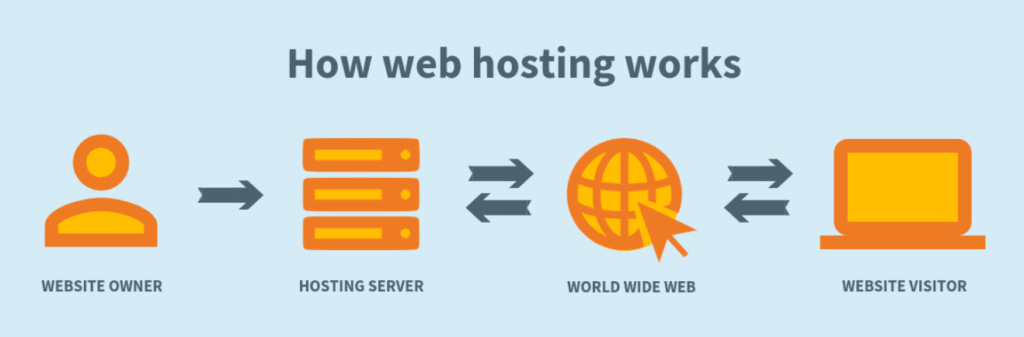
How Web Hosting Works

Hosting a website isn’t complicated. But you want to make sure you get it right the first time. Otherwise, it can cause you big headaches and problems down the road.

So how do you host a website?

There’s an overwhelming amount of information on the Internet about web hosting. The answer depends on multiple factors, such as your technical experience, type of website, and size of your website.

That was my inspiration for creating this guide. I’ve simplified the web hosting process into just five easy steps.

No matter what type of website you’re creating, you’ll be able to host it with ease if you follow the steps below.

Step #1: Research Web Hosting Providers

Web hosting is just like any other consumer product or service. If you wanted to buy a new car, you wouldn’t just walk up to a dealer and purchase the first one on the lot. You’d research different types of cars, makes, models, and dealerships to help you make an informed decision.

The same concept can be applied to web hosting.

All web hosting providers are not the same. Some are undoubtedly better than others.

Here’s the thing. There are dozens, if not hundreds of different web hosting providers on the market today. Your research process can help narrow your search. You’ll be able to eliminate certain hosts right away.

There are web hosting providers out there that specialize in speed, while others prioritize customer service. Some providers are best for small business websites and others are best for agencies or enterprises.

So where should you start your research?

Don’t just blindly start clicking through different web hosts on Google. That’s way too time-consuming and it won’t be very productive. Plus, you won’t know what to look for to see if the company is legit or not.

Web Hosting Providers

Nobody is going to search through all of those results. Instead, I’d recommend finding a third-party guide of reviews.

As an expert in web hosting, I’ve written one of these guides myself. After personally checking the features and performance of nearly every web host in existence, I was able to narrow down the top options. So check out my list of the best web hosting providers.

You don’t need to pick a provider just yet. But the research process will guide you in the right direction as you continue through each step in this guide.

Step #2: Determine Your Budget

This step can be tricky because it involves more than picking a price point. Your budget will also depend on the features you need and the type of hosting that you want (which we’ll get to in the next step).

How much does web hosting cost?

You can find hosting providers that offer plans for less than $1 per month, and other providers offering plans for $2,000 per month.

Having a rough idea of what you’re willing and able to spend will at least help you narrow down your options.

For example, if you’re starting a small personal blog and not expecting tons of traffic, you can get away with paying less than $5 or $10 per month for a cheap web hosting provider. Small business owners and ecommerce sites would likely want to look towards a higher pricing tier.

Web hosting is like any other type of product or service. In most instances, you get what you pay for. So don’t expect to pay $2 per month for the best web hosting experience on the planet.

While price doesn’t automatically equate to quality, it’s usually a good indication of how many additional features and benefits you’ll get with the plan.

If you want dedicated resources, lightning-fast loading speeds, cPanel, freebies, and 24/7 customer support, you can expect to pay a bit more for those hosting services.

Step #3: Choose a Hosting Type

Now that you’ve had a chance to research some providers and get an idea of how much you want to spend, it’s time to determine the type of hosting that’s best for your website.

You have four main options to choose from:

  • Shared hosting
  • VPS hosting
  • Dedicated hosting
  • Cloud hosting

I’ll give you a brief overview of each so you can figure out which one to use.
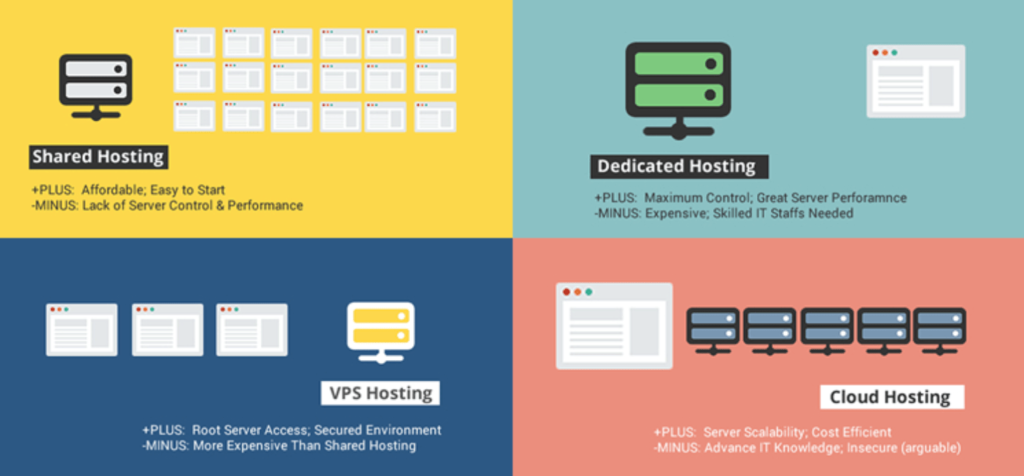
Compare Types of Hosting

Shared Hosting

Shared web hosting is a popular choice for new or entry-level websites. It’s the most affordable type of web hosting and doesn’t require a ton of technical knowledge.

A shared plan is ideal for websites that won’t be getting high volumes of traffic.

As the name implies, your website will be sharing server resources with other sites as well. This can impact the performance of your website. If another site on the same server has a traffic spike, it can cause the server to crash and bring down your website with it.

Take a look at my guide and reviews of the best shared hosting plans if you’re interested in this type of hosting option.

VPS Hosting

VPS stands for virtual private servers. With this type of hosting, you’ll be using a single server that’s been separated into multiple virtual machines.

VPS hosting is a step above shared hosting. Since you won’t be sharing your resources with other websites, it will improve the performance of your site. Expect to have more disk space, bandwidth, higher uptimes, and faster loading speeds with a VPS plan.

This is a great option for websites that will be expecting higher volumes of traffic and need enough resources to accommodate those users. VPS plans give you more control over your server settings as well.

If you’re interested in a virtual private server, check out my reviews of the best VPS providers in the web hosting industry.

Dedicated Hosting

The majority of new websites do not need a dedicated server. This hosting type is reserved for large websites that need enterprise-level hosting capabilities.

With that said, for those of you who are more tech-savvy and want complete control over your server settings and hosting environment, a dedicated server plan is the best way to get that.

A dedicated server gives you the most resources and therefore delivers the highest performance.

The biggest downside of a dedicated server is the price. This is the most expensive type of web hosting, which is another reason why it’s not ideal for new or small websites.

Cloud Hosting

Cloud web hosting is new compared to the other three options. But it’s definitely becoming a popular choice for website owners.

A cloud plan is ideal for websites that are growing and need to scale server resources as their site gets bigger. If your site is going to surpass 50,000 monthly visitors, it’s time for you to consider cloud hosting.

Cloud hosting is a step above shared hosting, yet it’s usually cheaper than a VPS plan.

If you choose this option, your site will be run on multiple cloud servers, which decreases your chances of having unexpected downtimes due to traffic surges or server issues.

I’d recommend a cloud hosting plan to new website owners who plan on growing their site as fast as possible in the coming years. By going with a cloud plan from the beginning, you won’t have to change your hosting type down the road as you outgrow a shared plan. Check out my list of the best cloud hosting companies to help you find the best plan for your needs.

Step #4: Select Your Hosting Plan

Using the information you’ve gathered in the first three steps, it’s time for you to choose a hosting plan.

Find a provider that offers the type of web hosting option you need at a price point that’s within your budget. You’ll likely have at least a couple of choices that fit this description. So here are some other factors that you should keep in mind when you’re evaluating a hosting plan.

Uptime

Uptime is the most important feature in web hosting. If your hosting provider isn’t offering a minimum of 99.9% uptime, then look elsewhere. Most web hosts will offer an uptime guarantee in their plans, and compensate you if they fail to meet that promise.

Resources

You need to make sure that your plan has enough resources to accommodate your website content and traffic.

The first thing to look at is RAM, which is your storage. 4 GB of RAM is enough for an average website. That’s the minimum I would recommend for you.

Next, you’ll have to consider the bandwidth offered in the plan. 120 GB of bandwidth is enough for 2,000 daily page loads of a 4 GB website. So if you are expecting more traffic or plan to have a larger website, you need to get more bandwidth.

Customer Support

You may not think so right now, but aside from the performance of your hosting plan, customer service should be your next priority. Roughly 20% of web hosting customers agree with this.
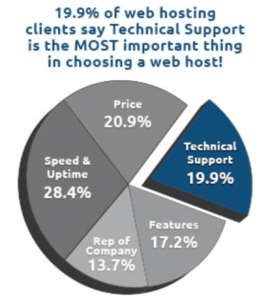
Web Hosting Support

In a perfect world, nothing will ever go wrong with your website or servers. But realistically, something is bound to go wrong at some point. That’s just the nature of the web hosting world. It happens to everyone, and your site probably won’t be immune from it.

During a time of trouble, you want to be able to get in contact with your web host immediately. So look for a plan that offers 24/7 support via phone and live chat.

Aside from that, you should also look for providers that have a knowledge base and resource center that will teach you how to do certain tasks on their platform. This type of customer support can really help you get the most out of your web hosting plan.

Renewal Rates

You need to look beyond the introductory rate of your web hosting plan to make sure that it will continue to fit within your budget in the coming years.

It’s common practice in the web hosting industry for providers to heavily discount new contracts, and then increase the fees when it’s time to renew. Normally, you can lock in the best possible rate by committing to the longest term length, which is usually up to 36 months.

But make sure you know how much your plan will cost you at the end of that period.

Freebies, Add-ons, and Additional Features

You should also be looking for plans that give you the best value for your money. Most hosting providers will include some extras in their plans as an incentive for you to sign up.

Here are some common features to look for:

  • Free domain (usually for the first year)
  • Free SSL certificate
  • Free cPanel license
  • Google Ads credit
  • Free site builder
  • Free site migration
  • Unlimited email accounts
  • Automatic backups

Most plans come with a money-back guarantee as well. 30 days seems to be the industry standard for this, but I’ve seen plans offer up to 97 days for you to change your mind.

Step #5: Register Your Domain Name

The domain name is your digital address. Ours is www.quicksprout.com.

I included this step last because you can potentially register your domain name from your hosting provider when you sign up for a hosting plan. Sometimes this will even come free depending on the plan and provider you go with.

But with that said, you can register your domain name elsewhere before you settle on a plan.

Personally, I like to keep my domain registration services and web hosting services separate. So I’d recommend using a domain registrar for this step. If you’re lost and don’t know where to do this, take a look at my guide on the best domain registrars.

Getting your domain from a web host isn’t necessarily wrong. So it’s fine if that’s what you prefer.

Regardless of where you get it from, this step needs to be completed in order for your website to be live on the web.

Alternative Option: Self Hosting (Not Recommend)

It’s possible to host your website without using a web hosting provider, although I would not recommend this option.

Self-hosting can be accomplished by using your computer or a Linux machine as a server. It requires lots of technical experience and a full understanding of how websites and servers work.

In many cases, self-hosting is slow, unstable, and unreliable. Plus, you’ll be responsible for all of the server maintenance, backups, software updates, and security on your own.

Overall, self-hosting is a bad idea, especially for beginners. So I don’t want to spend too much time talking about it. But I wouldn’t be doing my job properly if I didn’t at least mention it as an option.

Conclusion

Hosting a website isn’t as complicated as you might think. In fact, the whole process can be accomplished in just five simple steps.

  1. Research web hosting providers.
  2. Determine your budget.
  3. Choose a hosting type.
  4. Select your hosting plan.
  5. Register your domain name.

If you follow the steps in this exact order, it will give you enough information to make an informed decision. This is the most ideal way to host any website.


from Quick Sprout https://ift.tt/2MQdVs3

Thursday, October 24, 2019

How to Create a Website With WordPress

Creating a website used to be a massive project.

And expensive too.

Everything had to be built by hand and businesses needed to work with an online marketing agency that would charge them tens of thousands of dollars to build the site. If you wanted a professional-looking site, that was your only option.

Things have gotten a lot cheaper over the years.

Now it’s possible to get a polished site for less than $100. About $10 to buy the domain, $30–60 for a good template, and $5–10/month to host it. It’ll look so good that people won’t even realize that you built it yourself. It’ll look like some high-flying marketing agency built it for you.

Not only has it gotten cheaper, it’s also gotten a lot easier.

There’s a number of approaches you can take to creating a website.

Our General Take On Building a Website

Don’t get confused by all of the different options for creating a website. For a more in-depth look at how we think about this, check out our preliminary guide on how to create a website.

WordPress is King

In most cases, we highly recommend to build your website with WordPress. It’s an open source platform that allows you to run your website with very little technical expertise.

Some of the biggest websites on the Internet are built on WordPress. TechCrunch, The New Yorker, Variety and MTV News, just to name a few.

It’s also the most popular blogging platform, so there are hundreds of thousands of smaller websites that use WordPress.

WordPress is used by 33.4% of all the websites, and has a content management system market share of 60.3%.

Much of our content is centered around WordPress because we use it for all of our websites outside of Ecommerce.

Here’s the guide on how to create your website on WordPress.

Shopify for Ecommerce

For Ecommerce, we like Shopify — which is an Ecommerce website builder that allows you to get an online store up and running quickly.

The reality is that creating and running an online store can be a huge pain. Shopify takes that pain away. That’s probably why they are growing so quickly, and so many great online stores are popping up on the platform.

Here’s the guide on how to create your website on Shopify.

The Dozens of Other Options

If you’re reading this right now, then you most definitely fall into the category of someone that should be using WordPress or Shopify.

In rare cases, it might make sense to create a website using Wix or a similar website builder.

In other (very) rare cases, it might make sense to have a custom built website.

A Step-by-step Guide to Creating a Website With WordPress

I’ve broken down the 9 simple steps to create your website from scratch. You’ll easily be able to run through these steps over the next 120 minutes.

Step 1: Pick a name and find a domain for your website

These are not two separate steps, unfortunately.

I really wish I could sit down, pick any name that I want for my business, and be able to create the site that I want around that name. Now that the internet is a couple of decades old, we all have to face the reality that most of the good domains have been taken.

Here’s how a naming session always seems to go for me:

  1. In a moment of inspiration, we think of an amazing name.
  2. We hold on to this name for months, maybe even years.
  3. It’s time to start the business, so we go to purchase the domain.
  4. The domain is taken.
  5. We try a dozen small variations of our original idea, all taken.
  6. No biggie, we thought of one brilliant name, we’ll think of another one.
  7. Backup idea #2 = taken.
  8. Backup idea #3 = taken.
  9. Backup idea #4 = taken.
  10. Despair sets in.
  11. We start considering names that we don’t actually like, hoping that anything is available.
  12. We come up with 2 or 3 options that we don’t like at all.
  13. Then we spend a week trying to come up with a name that’s both available and a name that we can live with.
  14. Finally, we find one.

Websites have also become so embedded in our day-to-day lives that it’s better to change the name of the business to match an available domain than it is to pick a poor quality domain. Through this process, I almost always end up with a completely different name than I originally intended.

This is why I consider the “naming my business” and “buying the domain” steps for creating a business to be the same step. I try to only lock myself into a name once I have the domain.

We put together an in-depth guide on buying domains here.

The good news is that the rest of these steps are a breeze once you have your domain purchased. It’s the first and hardest step to create your website.

Step 2: Register your domain name

Real quick, let’s sort out the difference between a domain registrar and a web host.

A domain registrar is a company that specializes in buying (registering) domains.

A web host, on the other hand, specializes in running servers that host websites.

Every web host will desperately try to get you to also registrar a domain through them. The reason is that it’s a great upsell for them. They’ve spent most of their resources building out a hosting service, then they offer domain registration as a convenience, increase the price a bit, and collect a nice chunk of extra profit from you.

My philosophy is to buy things from businesses that specialize in that exact thing. Prices will be better and so will quality. That’s why I also use a domain registrar for buying domains and a web host for hosting. I never mix up the two.

The best domain registrar is NameCheap. That’s where I have all of my domain names.

We put together a detailed review of domain registrars here.

Step 3: Decide what kind of site you are creating

Most guides on creating a website will push you into using WordPress. It’s the most popular and flexible website builder. And that’s usually a good recommendation.

But there are a few situations where I recommend different options.

Simple Portfolio or “Business Card” Sites

Many businesses need a simple website that tells people a few things:

  • Who the business is for
  • What the business does
  • Sometimes a portfolio that shows off some work
  • Contact info

This kind of site gives the basic info for the business, nothing more. If this is what you need, Squarespace is your best option for creating your website. It’s incredibly simple to use and will give you a professional site at a very low price. It’s perfect for small businesses.

Squarespace will try to convince you that they can handle everything. That’s not true.

They’ve created the simplest and easiest website builder out there. Truly, it’s a joy to use.

However, they completely lack all the advanced features that an online business needs. The ecommerce functionality is extremely limited, and I don’t know any serious online marketer that uses Squarespace for a content site. If your business an online business, Squarespace isn’t a legitimate option. You’ll hit the limits of its features too fast.

If you know that you want an ecommerce store from the beginning, start on Shopify and skip Squarespace. And if you know you want a blog or are planning on doing lots of content, start on WordPress. The majority of this guide is around building a wordpress website.

Squarespace makes the most sense when you just need a clean, professional-looking site that gives some basic info on your business. It’s perfect for small businesses, freelancers, and artists.

Here’s another way to think about it: If you’re building a business that doesn’t live and die on its website, it just needs a website in case anyone looks for it, like a digital business card, then go with Squarespace. But if you’re website is your business, use one of the more tailored platforms.

Ecommerce Sites

If you’re planning on building an ecommerce store for your site, don’t use WordPress. We have an entire post here on when to use WordPress for ecommerce and when not to. The short story: it rarely makes sense to use WordPress for ecommerce.

The best option, by far, is Shopify. There used to be more competition in the ecommerce tool space but Shopify got too far ahead. Now they’re really the only option and they have an incredible reputation. You won’t regret using them for an ecommerce site.

If you’re going this route, we have a 9-step guide on how to create an ecommerce website. We also have a guide on how to start a store that drives real sales. Both of those guides will get you pointed in the right direction.

Blog Sites

If you want to create a blog with a bunch of content, you need to use WordPress. We have a detailed guide on starting blogs here. Most websites are really just blogs. Some of the biggest, and most well known websites on the Internet are blogs.

WordPress powers over 30% of the entire internet. So it’s the only real option for starting a blog these days.

What about Joomla or Drupal? Or Typepad?

WordPress left all those other platforms in the dust about a decade ago. They’re not even legitimate options at this point. Pick WordPress — there isn’t a single situation where you’ll regret it.

When I originally started with this online thing, Drupal sites were still pretty common. I partnered up with an engineer friend of mine and we did a lot of freelance work migrating sites from Drupal to WordPress. Even back then, WordPress was a clear winner.

Now when I come across a site on any of these other tools, it’s kind of exciting. It’s like finding an ancient artifact. “This still exists!? How fascinating!”

Don’t use any of these other tools, stick to WordPress.

Everything Else

If you’re not sure or have another vision for your site outside the categories above, use WordPress. It’s the most flexible platform out there. It will do ecommerce, it’ll do simple portfolios, it’ll do massive content sites, it’ll do Fortune 500 marketing sites, it’ll do it all.

You might have to customize it more than other platforms in some situations but you can make WordPress do whatever you want it to. And just about anyone in online marketing knows their way around WordPress so you’ll be able to find plenty of people to help you when the time comes.

Whether you want to build your site by hand or you have an online marketing agency to do it for you, you should still build on top of WordPress. It’ll shortcut a lot of the programming work and give you the ability to edit basic items on your site without having to edit any code. I’ve managed marketing sites of venture-backed tech startups that employed dozens of engineers — we still had our marketing site built on top of WordPress. It’s the standard choice.

Step 4: Get a host for your website

For the rest of this guide, I’m going to assume that you’ve picked WordPress to create your site. If you want an ecommerce site, skip the rest of this guide and follow our guide on creating an ecommerce site.

WordPress is the tool that you’ll use to build your website. But you also need a host that will store your site and make it available to anyone who visits.

The best place to go for most people is Siteground.

We have an entire guide here that goes through all the best web hosts.

Hosting plans usually start around $5/month.

Step 5: Install WordPress

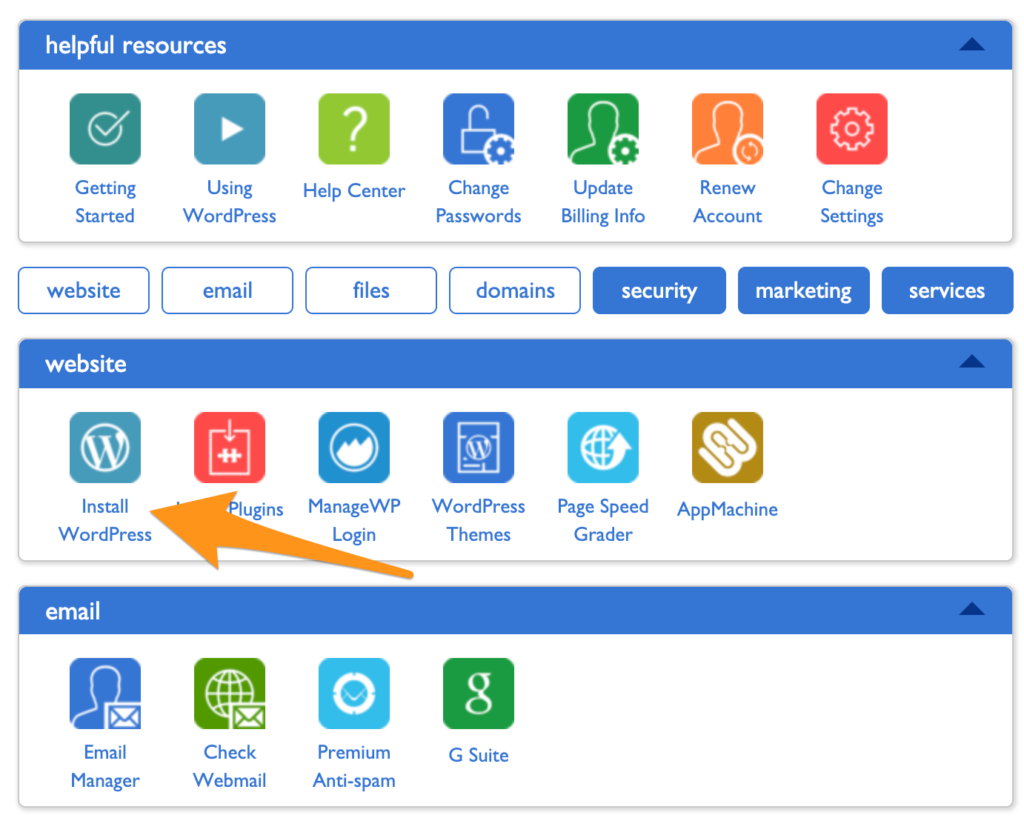
Just about every website host has a 1-click install of WordPress. Siteground, the hosting provider I recommend the most has this feature. It’s usually under a section called Tools, Website, Software, or Content Management Systems (CMS). It’ll look something like this:

Install WordPress

If you have trouble finding it, contact support at your host and they’ll be able to walk you through it.

Step 6: Point your domain to your host

Let’s do a quick recap.

  • You bought your domain using a domain registrar.
  • You signed up for a hosting plan.
  • You installed WordPress on your host.

Now you’re going to connect all that stuff together by pointing your domain to your host. Then when people go to your domain, they’ll end up on your website.

There are a few technical settings you need to apply. This involves configuring a few nameserver settings on your domain registrar for your domain. Your host will give you the correct settings; you’re looking for their nameserver settings.

If you get stuck, contact your host and they’ll give you all the info you need.

Once you have the nameserver info from your host, go into your domain registrar and configure those settings for the domain that you want to point at your site. Once you’re done, it’ll look something like this:


Create a Website Name Servers

Step 7: Install a WordPress theme

Think of WordPress as the guts of your site, it’s all the pumping that makes your site work.

WordPress uses themes to determine how your website looks. This makes it really easy to change how your site looks without having to rebuild your site from scratch. Swap out your old theme for a new one and ta-da! Your design will look completely different.

These days, I purchase all my themes from StudioPress.

Heads up, WP Engine bought StudioPress and now includes all the StudioPress themes in its hosting plans. WP Engine is more expensive but it’s perfect for serious bloggers. It’s a great way to save money on your theme if you are planning on building a large site to begin with. WP Engine is another one of our recommended hosts if you’re looking for the best. The downside is that WP Engine tends to be more expensive than other hosts. It’s probably overkill if you are just starting out, or creating your first website.

Back to themes, are there other options?

You betcha. ThemeForest has a marketplace of WordPress themes. There are literally tens of thousands of themes to pick from. They’re usually in the $30–60 price range. When looking for theme, I rank them by the most popular or the highest rating. Then I pick one I personally like.

After you’ve purchased a theme, go to the WordPress Theme settings and upload your theme. The Theme settings are under Appearance in the WordPress sidebar menu. You’ll have to click through “Add new” and “Upload Theme” in order to see this option to upload:

Upload WordPress Theme

Go ahead and upload the .zip file you received when you purchased your theme.

After it’s uploaded, you’ll also have to click “activate” on the theme in WordPress to make it go live.

Step 8: Add content to your website

Now the fun part — it’s time to create the individual pages of your site.

You’ll do this within WordPress.

WordPress has two types of content: pages and posts.

Think of posts as blog posts that are published under a “blog” section of a site. If you’re not planning on having a blog, then you can skip posts entirely.

Pages are the more permanent pages on your website. Like your About or Contact Us pages. When you’re first creating your website, you want to get a batch of pages live so your site feels real.

Every website has a few standard pages you should create:

  • Homepage – Your WordPress theme usually has settings for this page.
  • Contact Page – Create a new page and install a WordPress form plugin so you can add a form to the page.
  • About page – Tell your story and why you’ve started your business.
  • Product or services pages – For the main services or products that you’re offering, it’s a good idea to create a dedicated page for each.
  • Blog – If you’re building a blog, make sure all your posts get listed here.

This list will get you started. You can always add more later.

Step 9: Continue evolving your website

At this point, you have a fully functioning site that looks great.

I’m not going to lie, there’s a lot of extra configuration you can do to your site: you can add WordPress plugins that upgrade your site, build out a blog, add an email list, grow traffic, the list is endless.

You don’t have to do any of this extra stuff — it’s all optional. It depends on your priorities and goals.

A website is an ever evolving thing. The way it looks after you first create it, won’t be how it looks a couple months later. At least that is the case if you are actively working and growing your website.

When you’re ready, these guides will walk you through the extra stuff that’s worth considering:

More Guides On Creating and Managing a Website

How to Plan Out Your New Website

How to Buy The RIGHT Domain Name – A Detailed Guide

How to Develop Your First Brand Identity on a Budget

The 5 Best Website Builders

The 5 Best Domain Registrars

10 Trending 2019 Website Color Schemes

9 Places To Get Website Images (Paid and Free)

The Best Website Fonts That Go Together in 2019

13 Website Design Best Practices

7 Reasons Why You Do NOT Need to Hire a Website Designer

The 22 Key Elements of a High Quality Website

How Much Copy Should You Write on Your Homepage?

10 Contact Page Techniques That Make People Contact You

How To Create an About Page That Matters

How to Make a Wix Website in 6 Easy Steps

Some useful guides for optimization as your site gets up and running:

Website Speed

Website Usability

Website Security

Website Mobile Friendliness

5 Easy Steps to Creating a Sitemap For a Website

Should You Switch Your Site to HTTPS? Pros and Cons

The Top 10 Principles That Boost Your Website Loading Time

Web Hosting Guides

You need a web hosting provider in order to have a website.

We recommend SiteGround for most people. For advanced WordPress users, with high traffic websites, it could make sense to move to WP Engine at some point.

More about The Best Web Hosting Companies here.

Here are some additional guides to help you learn more about web hosting:

Everything You Need To Know About Web Hosting

The Best Web Hosting for Small Business

The Best Web Hosting for WordPress

The Best Free Web Hosting

The Best Cheap Web Hosting

The Hidden Costs of Website Hosting

Analytics and Reporting

An analytics tool is important if you want to know what’s happening on your website. It tells you how much traffic you’re getting, where it’s coming from, and what people do on your site. Google Analytics is the standard. That’s what we use for Quick Sprout.

Read more about why Google Analytics is the best.

Installing Google Analytics is easy. Consuming the reports is a bit more complicated.

Here are some guides to help:

The 2 Website Analytics Tools Pros Actually Use in 2019

Setup Google Analytics in 3 Steps – The Beginner’s Guide

10 Vital Customizations to Make in Google Analytics

A Guide to Google Analytics Add-on for Google Sheets

How to Track Your Leads with UTM Parameters

Building and Optimizing With WordPress

A WordPress website is basically made from what’s called a WordPress Theme and WordPress Plugins. All of the features of your website will come either from the theme or the plugins you install.

To help you get started, we reviewed all of the best WordPress Plugins across the most popular categories.

Here’s an in-depth review for each category:

Best SEO Plugins for WordPress

Best WordPress Gallery Plugin

Best WordPress Backup Plugin

Best Form Plugin WordPress

Best WordPress Cache Plugin

Best WordPress Security Plugin

Best WordPress Calendar Plugin

Best Google Analytics Plugins for WordPress

Best WordPress Popup Plugin

Best WordPress Directory Plugin

Best WordPress Booking Plugin

Best Membership Plugins for WordPress

Best Social Media WordPress Plugin

Ecommerce Websites

If the primary purpose of your website is to sell products, you’ll need an ecommerce website. We recommend keeping it simple and going with Shopify.

Read our full review on Shopify to see why.

Check out our review of the Best Ecommerce Platforms, to get a comparison to the other options out there.

Get the step-by-step on how to start an online store.

Our guide on how to create an Ecommerce website.

More useful guides on building an Ecommerce website:

WordPress Ecommerce

How to Transfer Your Website to Shopify

Best Ecommerce WordPress Themes

Best Ecommerce Website Builder

Checkout Process Design

Ecommerce Color Schemes

How to Create a Trust Seal On Checkout Page

Starting a Blog

When you really break it down — most websites are blogs, and blogs are websites. They have become one and the same. The most popular blogging platform is WordPress, and that is also the same platform we use for any other website, blog or otherwise.

If you’re thinking about starting a blog specifically, and that is why you’re trying to figure out how to create a website…we have over 40 guides on blogging.

Here are the blogging guides specific to getting started, and building your blog:

How to Start a Blog

Best Blogging Platforms / Blog Sites

Best WordPress Themes for Blogs

Blog Design

11 Things I Wish I Knew Before I Started My First Blog

The Top 12 Tips for Running a Successful Video Blog

10 Lessons Seth Godin Can Teach You About Blogging

100 Lessons Learned from 10 Years of Blogging

Creating Your Own Website: In Summary

Creating your website might seem overwhelming at first. It really comes down to starting with these simple steps:

  1. Is your primary purpose to sell things on your website? If yes, then focus on Shopify, if no, then focus on WordPress.
  2. Use the guides on Quick Sprout to help you through the process. It’s a learning curve for sure. Taking the time to set up everything correctly will help you grow your business and your traffic much faster later on.
  3. Don’t hesitate to reach out to us directly via email with questions. We’ll help however we can.


from Quick Sprout https://ift.tt/31L2TJ0

Best Cloud Web Hosting Plans

Traditionally, there have always been three main types of web hosting.

  • Shared hosting
  • VPS (virtual private server) hosting
  • Dedicated server hosting

But cloud hosting is a newer type of web hosting that’s very appealing and rapidly growing in popularity.

Your hosting plan and provider is the lifeblood of your website. So when you’re evaluating the best web hosting providers, you need to consider every possible option.

Just because something is new or unfamiliar, it doesn’t mean that you should take it out of the running for your decision. That was my inspiration for writing this guide.

In many cases, cloud hosting is an ideal option for the majority of websites out there. So if you’re interested in learning more about this alternative type of hosting, you’ve come to the right place.

I’ll explain exactly what cloud hosting is, how it works, and show you some of the best cloud web hosting providers on the market today.

You can use this information to help you pick a cloud hosting plan that fits the needs of your website.

What is Cloud Hosting?

Broadly speaking, “the cloud” typically refers to remote storage solutions. For example, you can store pictures from your smartphone or documents on your computer to a cloud storage space like Google Drive.

This is different than storing files locally on something like an external hard drive. I’m sure you’re familiar with both of these scenarios, and you probably even use cloud storage for something in your digital life.

When it comes to web hosting, the cloud is a little bit more in-depth, but the same principles still apply.

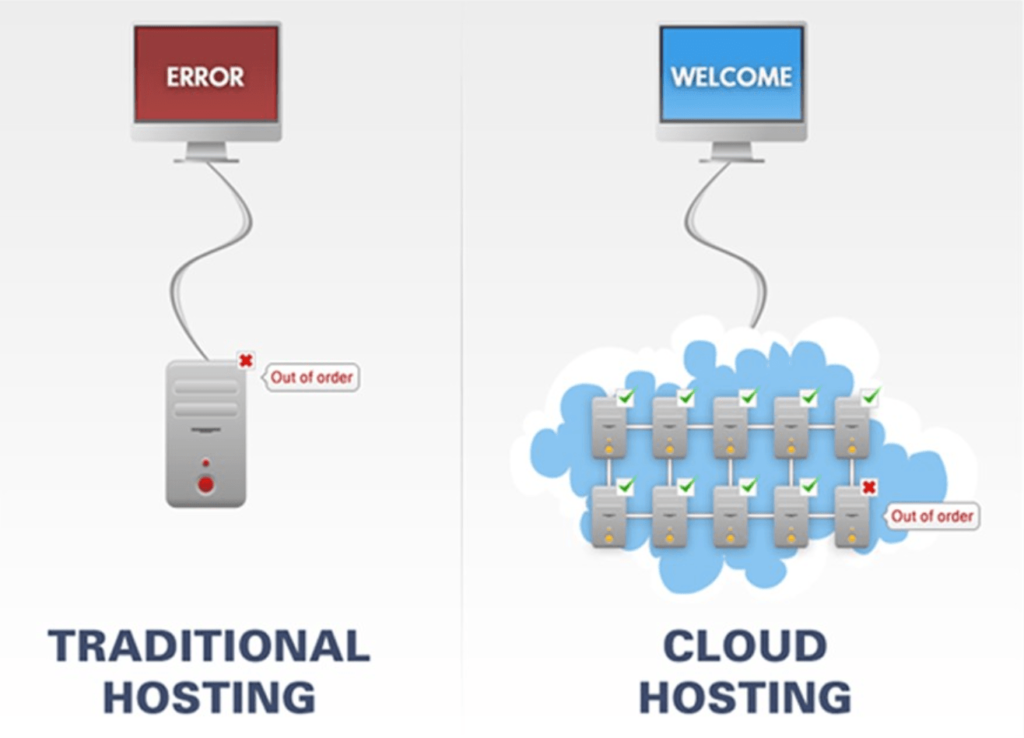
With cloud hosting, your web host isn’t connected to one physical location. Your website resources are maintained across multiple virtual servers in the cloud.

Each cloud server is responsible for specific sets of tasks. If one of the servers in the cloud fails or goes down, the others will automatically pick up the slack to render those required resources.

Cloud Hosting VS Traditional Hosting

As you can see from this visual representation, your website will continue to run smoothly with cloud hosting, even if there is a problem with one of the servers.

Your website will benefit from increased uptime rates and won’t be as susceptible to unplanned downtime.

With a singular server, you’re essentially putting all of your eggs in one basket. This is a huge risk when you’re dealing with something as important as your website.

In addition to fixing potential problems with one server, cloud hosting will keep your site stable, even as your traffic increases.

Cloud hosting is also extremely easy to set up. For those of you who want to start hosting on the cloud right away, it can be a faster deployment option than something like a dedicated server or shared server.

Who is Cloud Hosting For?

Cloud web hosting is ideal for medium to larger-sized businesses and websites that are growing rapidly. One of the major benefits of cloud hosting is the ability to scale resources on-demand, which is crucial for growing websites.

Most cloud hosting plans have flexible pricing options, meaning you’ll only pay for the resources that you’re actually using.

If you’re anticipating random traffic surges or a steady increase in website traffic in the coming years, then cloud hosting is the perfect option for you.

Cloud hosting isn’t for everyone.

For those of you who have a small personal website, small blog, or a micro-business, you probably don’t need to use cloud hosting if there is no growth coming in the future. A shared hosting plan is fine for those types of websites.

When you’re ready to grow your website, you should consider upgrading to a cloud hosting plan as opposed to a VPS. While a virtual private server will be able to deliver enough server resources, a cloud plan is usually more cost-effective.

Enterprise-level websites with the need to customize their server settings would benefit from a dedicated hosting plan rather than a cloud solution.

Any website with more than 50,000 monthly visitors is a viable candidate for cloud hosting. It’s the perfect option for larger websites that can’t afford to have any downtime.

Cloud Web Hosting Reviews

There are lots of hosting providers out there right now that offer cloud web hosting services. But not every plan is the same.

I’ve taken the time to research all of the factors that determine a great cloud web hosting plan. As a result, I was able to identify the top cloud hosting providers:

Check out the detailed reviews of each one below so you can determine which hosting provider has the best plan for your website.

SiteGround

Siteground Cloud Hosting

SiteGround cloud hosting is perfect for websites that have outgrown their shared plans.

These plans are fully managed, meaning that their DevOps configure your entire cloud account for you. With SiteGround handling the IT aspect of your hosting, you can focus on other areas of your business and website.

You can add resources like RAM and CPU at any time with just one click in your admin settings. One of my favorite features is the ability to turn on auto-scaling, which will automatically render appropriate resources during times of unexpected traffic spikes.

With SiteGround, you can completely configure your own cloud and plan based on the resources you need. But here’s a look at their basic plans:

Entry Cloud

  • Starting at $80 per month
  • 2 CPUs
  • 4 GB of memory
  • 40 GB of SSD space
  • 5 TB of data transfer

Business Cloud

  • Starting at $120 per month
  • 3 CPUs
  • 6 GB of memory
  • 60 GB of SSD space
  • 5 TB of data transfer

Business Plus Cloud

  • Starting at $160 per month
  • 4 CPUs
  • 8 GB of memory
  • 80 GB of SSD space
  • 5 TB of data transfer

Super Power

  • Starting at $240 per month
  • 8 CPUs
  • 10 GB of memory
  • 120 GB of SSD space
  • 5 TB of data transfer

The Business or Business Plus plans should be more than enough resources for the majority of you, so that’s what I would recommend starting with. As I said before, you can always scale your resources to meet traffic demands.

SiteGround provides advanced priority support to its cloud hosting clients.

You’ll also benefit from webmaster tools like a dedicated IP, free CDN, free SSL, daily backups, and a private DNS.

HostGator

Hostgator Cloud Hosting

HostGator is one of the most well-known names in the web hosting industry. Their cloud hosting plans are some of the most cost-effective options on the market today.

Let’s take a look at some the three basic cloud hosting plans offered by HostGator:

Hatchling Plan

  • Starting at $4.95 per month
  • 2 CPUs
  • 2 GB of memory
  • Single domain

Baby Plan

  • Starting at $6.57 per month
  • 4 CPUs
  • 4 GB of memory
  • Unlimited domains

Business Plan

  • Starting at $9.95 per month
  • 6 CPUs
  • 6 GB of memory
  • Unlimited domains

It’s worth noting that these prices are introductory rates for 36-month contracts. They are 45% cheaper than the actual price, which you’ll end up paying when you renew your contract.

All cloud hosting plans come with a free SSL certificate. The Business plan comes with a dedicated IP, free SEO tools, and free domain as well.

I like HostGator because the dashboard makes it easy for you to monitor the performance of your website. You can quickly view data related to page speed, uptime, reach, and more.

Scaling your server resources is simple as well. This can be done with just one click, without any downtime, reboots, or data migrations.

DreamHost

Dreamhost Cloud Hosting

DreamHost has the easiest cloud setup in the industry. You can get your cloud servers live in less than 30 seconds. With that said, DreamHost cloud is best for developers.

They have server options that are made for databases, web apps, and running tests in addition to websites.

You can continue working the with DevOps tools that you’re already using. DreamHost also gives you full root access for complete control over your cloud servers.

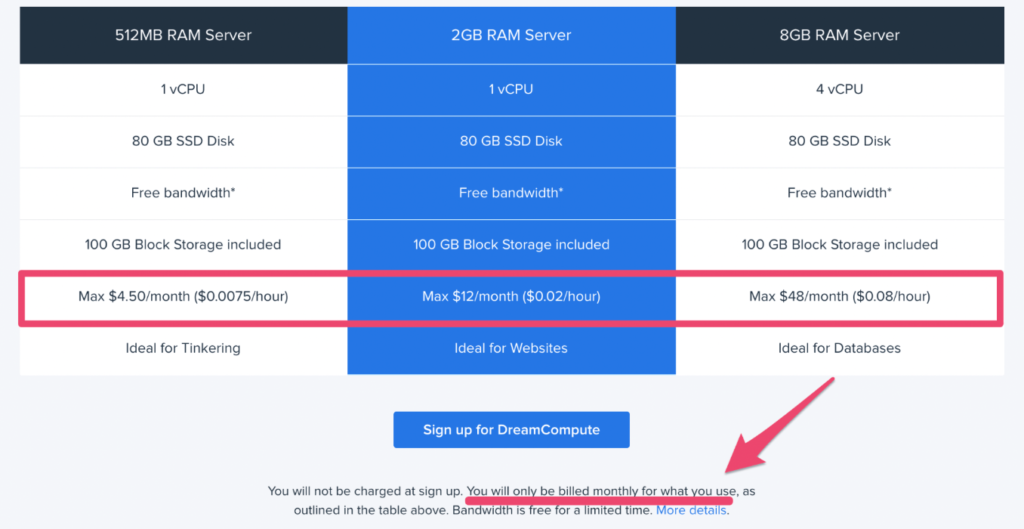
The best part about DreamHost is that you only pay for what you actually use. You’ll get charged for resources on an hourly basis based on the size of your server.

  • 512 MB of RAM Server — $0.0075 per hour (maximum $4.50 per month)
  • 2 GB of RAM Server — $0.02 per hour (maximum $12 per month)
  • 8 GB of RAM Server — $0.08 per hour (max $48 per month)

The 2 GB server is the recommended option for websites.

You will not be billed anything when you sign up. Instead, you’re billed based on your monthly usage.

The only area where DreamHost falls short is their customer support. You can only contact customer service via email or live chat, which is only available for 16 hours daily. So if you prefer phone support or need help in the middle of the night, you’re out of luck until the morning.

A2 Hosting

A2 Cloud Hosting

A2 Hosting has a reputation for being one of the fastest web hosting providers on the market. Their cloud plans are just as fast and reliable.

I like the A2 cloud options because the plans are fully customizable based on your needs.

Plans start at $5, $10, and $15 per month, respectively. But you only pay for the resources that you use based on how you configure your cloud servers.

If you want to have cPanel, it’s an extra $19.95 per month and not available with the lowest-tier pricing plan.

A2 offers a 99.9% uptime promise as well as an anytime money-back guarantee. Although there are some contingencies to both, so make sure you read the fine print of your contract.

If customer support is important to you, then you’ll definitely be satisfied with A2’s 24/7/365 guru support team.

This cloud hosting provider is ideal for those of you who want unmanaged cloud hosting with lightning fast page loading speed.

InMotion

Inmotion Cloud Hosting

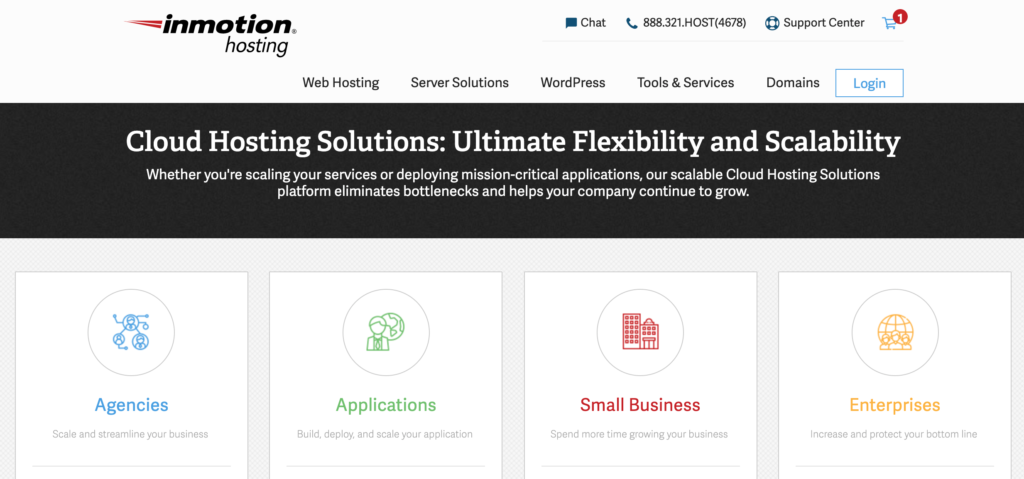
InMotion may not be the most well-known hosting provider in the industry, but its cloud hosting plans are certainly some of the best.

They have cloud hosting solutions for everyone.

  • Small business cloud hosting starting at $29.19 per month
  • Agency cloud hosting starting at $41.64 per month
  • Application cloud hosting starting at $21.04 per month
  • Custom pricing for enterprise cloud hosting plans

Altogether, InMotion has 10 different plans and pricing tiers for cloud hosting, which is the most I’ve seen offered by any provider.

For website owners, you’ll want to focus on the small business plans. InMotion makes it easy for you to scale your resources as your site grows.

You’ll also get a resource monitoring dashboard, free auto backups, rapid provisioning, and full snapshots of your servers. InMotion offers a free SSL and free cPanel license with all of its cloud business plans.

How to Find the Best Cloud Hosting Plan For You

Not every cloud hosting plan is the same. Some hosting providers offer different features and benefits compared to others.

When you’re evaluating a cloud web host, these are the factors that you should take into consideration.

Scalable Resources

You need to make sure that you get a web hosting plan with enough bandwidth, storage, and disc space. In order to make this decision, you need to have some idea of how much traffic you’re going to get. But new websites face a common dilemma when they’re looking for a hosting plan.

They have to decide if they want to get the highest possible bandwidth, even if they won’t come close to exceeding those limits. Or should they start with a lower bandwidth plan and upgrade as their traffic starts to increase?

Cloud hosting solves this dilemma.

Since your website is hosted on multiple servers, you won’t have to worry about exceeding bandwidth. If one server is maxed out, you can always pull resources from another.

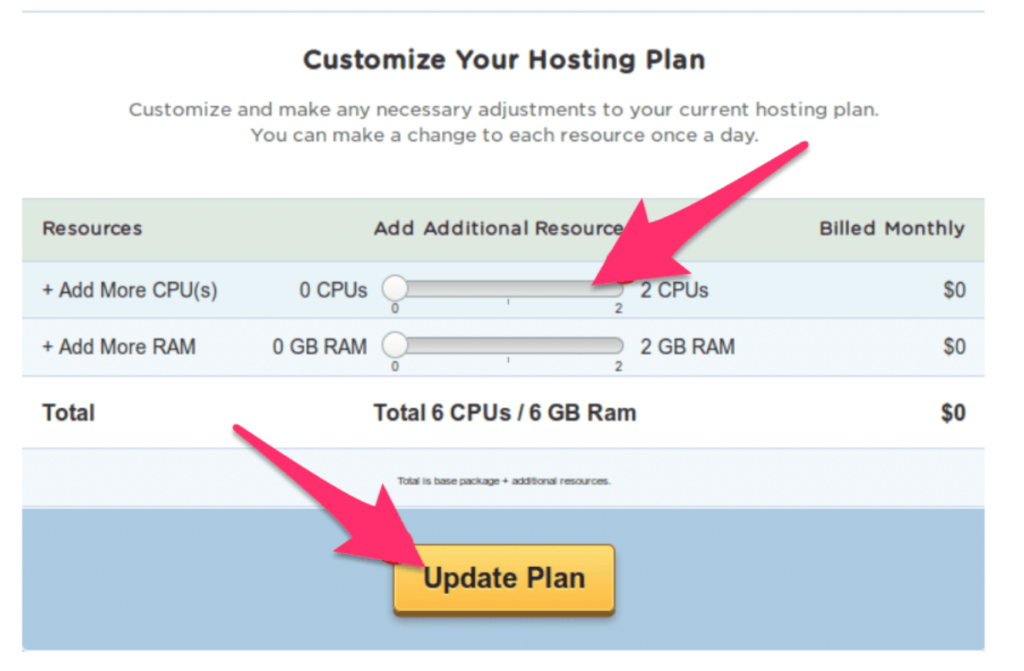
Look for a cloud hosting plan that lets you easily manage and configure your server resources in-real time.

Here’s an example of what this looks like on HostGator Cloud, which is a provider that we reviewed earlier in this guide.

Hostgator Resources

I’d recommend a cloud hosting plan that allows you to scale your server resources without needing any approval from the provider. This is something that can be managed from your admin dashboard.

Price

Most traditional hosting plans require you to pay a fixed monthly rate. You’ll be charged this amount even if you don’t use all of the resources on the server.

But cloud hosting is much more flexible in terms of pricing. So I’d look for a hosting provider that charges you based on the resources that you actually use.

Here’s an analogy. Let’s say you go to an all you can eat buffet, where the food options can also be purchased à la carte. The buffet price is $20 per person, which is the most you’ll have to pay, regardless of how much food you eat.

But if you only eat $10 worth of food, then wouldn’t it be nice to get $10 back?

That’s how some of the best cloud hosting plans are structured.

This relates back to our previous point about being able to scale your resources on demand. For example, let’s say you just built a bunch of new backlinks and you’re expecting a particular blog post on your website to go viral.

Rather than upgrading your entire plan (which you’d have to do with other types of web hosting) you can just increase the resources needed during that traffic spike and put everything back to normal when your traffic levels out.

In this case, you’d only pay for the actual server usage during the surge. Here’s an example of this pricing structure from another one of the providers on our list, DreamHost.

Dreamhost Useage

As you can see, pricing is based on usage. Each plan has a maximum monthly rate. Even the fine print at the bottom of the page states that you’ll only be billed for what you use.

So look for a hosting provider that offers a similar pricing structure.

Speed and Performance

Uptime rates, speed, and performance need to be a priority for every website owner. If your hosting plan doesn’t deliver the best performance, then it doesn’t matter how cool, new, or high-tech the solution is.

The majority of cloud hosting servers will increase the capacity of your website, which boosts your page loading speed.

Cloud hosting doesn’t put as much strain on a singular server, the same way it would if you had a shared, dedicated, or VPS plan. If your website has lots of resource-intensive data such as videos, images, and other media content, then cloud hosting is something that you need to take advantage of.

Look for a cloud hosting plan that delivers content from the nearest remote server. This will ensure that all of your loading times are as fast as possible.

At the end of the day, your website visitors don’t care what type of hosting plan you’re using. They just want your site to be responsive and load quickly.

By prioritizing things like uptime and loading speed with cloud hosting, your website will ultimately perform better from the user end.

Security

No matter what type of web hosting plan you have, security always needs to be a priority.

Fortunately, cloud hosting is known to be very safe. That’s because your website is isolated from any potential problems with a physical server. Everything is being handled remotely, which wouldn’t be the case if you were relying on a singular server that’s hosted locally.

If a local server was compromised, then your website would be at risk. Whereas if one server in your cloud network was hacked, failed, or had a system overload, your website would stay up and running without any downtime or delays.

Look for a web host that offers any additional security protection as an incentive with your cloud hosting plan.

Conclusion

Cloud web hosting is the perfect solution for growing websites. If your shared plan can no longer accommodate the needs of your site, then you should consider switching to a cloud solution.

So what’s the best cloud hosting provider? It depends on what you’re looking for.

Here’s a recap of the cloud hosting reviews above:

  • SiteGround — Best cloud hosting for scaling resources.
  • HostGator — Best cheap cloud web hosting.
  • DreamHost — Best cloud hosting for developer projects.
  • A2 Hosting — Fastest cloud web hosting.
  • InMotion — Best cloud hosting for small businesses.

I’m confident that one of these options will fit the need for your website. So if you’re looking for a reliable cloud hosting provider, you should start here.


from Quick Sprout https://ift.tt/2Pgy2kJ

Everything You Need To Know About Web Hosting Uptime

Uptime is the most important part of hosting your website. This should be the first thing you use to evaluate the quality of a potential hosting provider.

What exactly is uptime?

By definition, this is the amount of time that the server hosting your website is up and running. Uptime rates are typically listed as a percentage, such as 99.95%.

If a hosting provider has strong uptime rates, then it’s a good indication that their servers perform well. So if you choose a provider based on this metric, then you can assume that your site will stay up and running nearly all of the time.

The problem with choosing a web hosting plan based on uptime is that it’s tough to independently verify claims made by different web hosts. Nearly every hosting provider will claim to have high uptimes, which forces you to take their word for it.

That’s why I created this guide.

I want to clarify any misconceptions about uptime rates in web hosting. I’ve done the research and identified the web hosts with the best uptime rates to help you make an informed decision.

Whether you’re creating a new website or you’re planning to switch hosting providers for your existing site, this resource will be a valuable reference.

Why is Uptime Important?

Imagine this—a user lands on your website and it doesn’t load. Now what?

88% of online consumers are less likely to return to a website after having a bad experience. I think it’s safe to say that a down website falls into this category.

You spend so much time, money, and effort finding different ways to drive traffic to your site. But if the site isn’t live up and running when people arrive, it’s a major concern.

Every second that your website is down has a direct impact on the success of your website.

Downtime causes lost sales, missed lead generation opportunities, and creates a negative perception about your brand in the eyes of the consumer. Think about it for a minute. What would your impression be of a website that wasn’t loading when you tried to access it? You’d probably just look elsewhere for your needs.

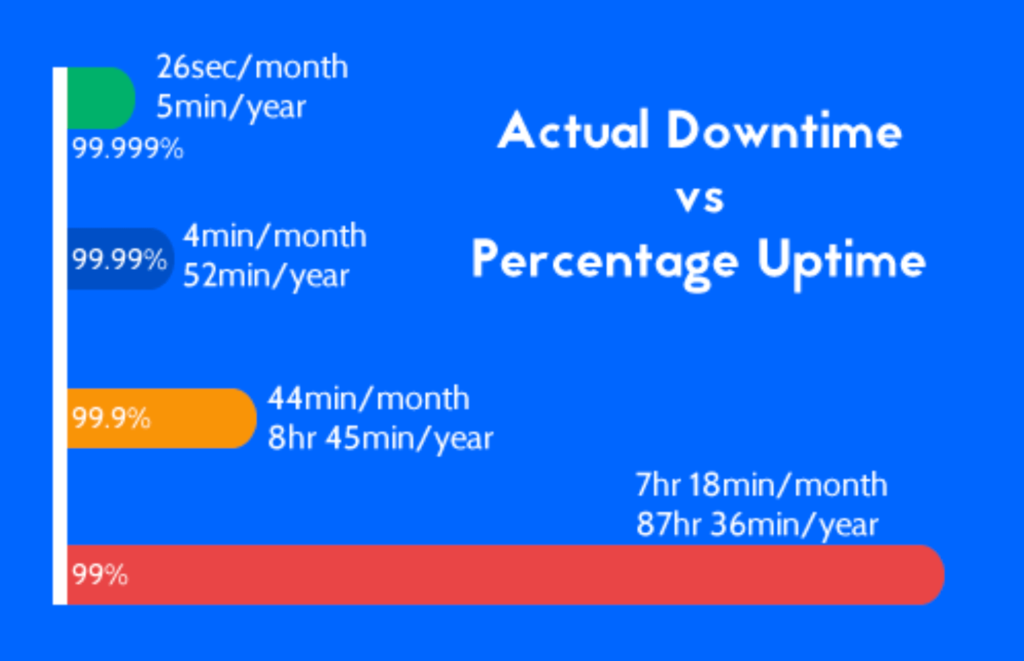
A 99% uptime rate might sound good. But if you translate that percentage into time, you’ll quickly realize that is not the case.

Web Hosting Uptime

If your site was up for 99% of the time, it would be down for more than 3.5 days throughout the year.

I wouldn’t consider a provider offering anything less than 99.9% uptime, which is typically the industry standard. But as you can see from the graph above, there is still a drastic difference between 99.9% uptime and 99.99% uptime rates.

Uptime also has a direct impact on your SEO ranking. If your site is down frequently, Google and other search engines will penalize you for it.

Best High Uptime Web Hosting Providers

There are plenty of hosting providers out there delivering high uptime rates. But with that said, you shouldn’t choose a plan based solely on uptime.

You’ll be out of luck if your provider has high uptime rates but poor customer support. When your site goes down (which it will eventually) then you’ll want a provider that is easily accessible and acts quickly.

The providers below all have strong uptime rates as well as other factors that make a great web host.

HostGator

Hostgator

More than 8 million domains are hosted on HostGator. This provider offers a 45-day money-back promise and a 99.9% uptime guarantee on all shared hosting plans.

If HostGator fails to meet this guarantee, they’ll issue a credit for one month of your plan. You just need to create a support ticket within 30 days of the month that it happened.

The 99.9% uptime guarantee only applies to HostGator’s shared and reseller plans. Dedicated servers are prorated based on the amount of downtime.

HostGator is very affordable. Even the highest-tiered shared plans start at less than $6 per month.

Another reason why I recommend HostGator is because they offer 24/7 support 365 days per year via phone and live chat. So if your site is down for any reason, you’ll be able to get in touch with their team to straighten everything out.

For some of the best uptime rates on the market, you should consider using HostGator Cloud. These plans are priced higher than their traditional shared options, but it’s the best way to scale your server resources. You can read my full HostGator Cloud review here.

Media Temple

Media Temple

Media Temple has a 99.99% uptime promise. They call it the “DV 20/20 uptime guarantee” because they refund 20% of your monthly fee for every 20 minutes of downtime. This is one of the best promises on the market, although there are some contingencies.

This guarantee is only offered for the DV (developer) plans. Those are self-managed and managed VPS plans starting at $30 per month and $55 per month, respectively.

Media Temple defines uptime as the server having power, being connected to the internet, and responding to a ping.

Scheduled maintenance, repairs, emergency maintenance, DDoS attacks, outages due to programming environments, and problems caused by you or your location are not covered under this promise.

Credits max out if you reach 100% of your monthly billing rate. In order to receive this credit, you must request it from Media Temple within five days of the occurrence.

SiteGround

Siteground

SiteGround is one of the most reputable names in the web hosting industry. They have outstanding customer service and deliver 99.99% uptime rates.

The reason why SiteGround’s uptime rates are so strong is because of the technology that they use. This provider uses Linux containers that remain stable during unexpected traffic surges. The technology is resource-efficient, meaning that servers won’t be overloaded very easily.

SiteGround’s staff leverages technology to proactively monitor all of the servers in-house.

This monitoring system makes it easy for SiteGround to quickly identify and fix any errors that are causing downtime. Furthermore, by actively monitoring servers, they are able to predict potential problems and prevent them before any downtime occurs.

SiteGround uses AI to prevent brute force attacks that can cause downtime. This solution can stop up to 2 million attacks per hour across all servers.

Shared hosting plans from SiteGround start as low as $3.95 per month.

DreamHost

Dreamhost

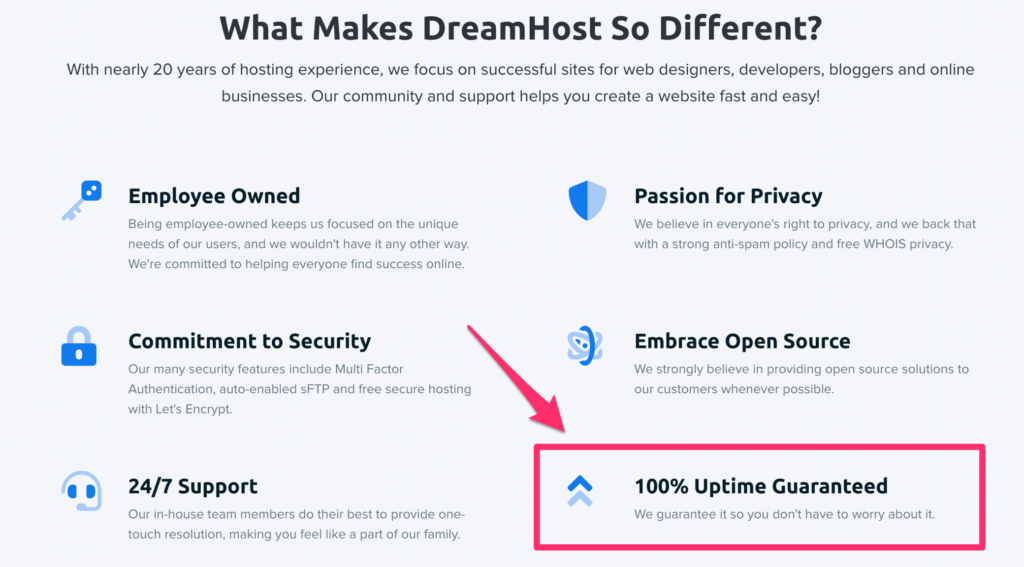
With a 100% uptime guarantee, DreamHost’s promise is unmatched by its competitors. Even with such a significant uptime promise, DreamHost offers some of the most affordable plans on the market today.

If DreamHost fails to meet this promise, they will credit you one day of hosting for every one hour of downtime, up to 10% of your next renewal fee.

Like most hosting providers, there is a catch to this policy. DreamHost only starts assessing downtime once you open a support ticket reporting the problem.

That’s why you need to have a web monitoring service that will notify you whenever your site goes down. But we’ll talk about that in greater detail later.

More than 1.5 million websites use DreamHost for web hosting. DreamHost also offers a 97-day money-back guarantee, which is the best I’ve seen in the industry.

A2 Hosting

A2 Hosting

In addition to uptime, speed is one of the most important factors to consider when you’re evaluating a web hosting provider. A2 Hosting specializes in speed.

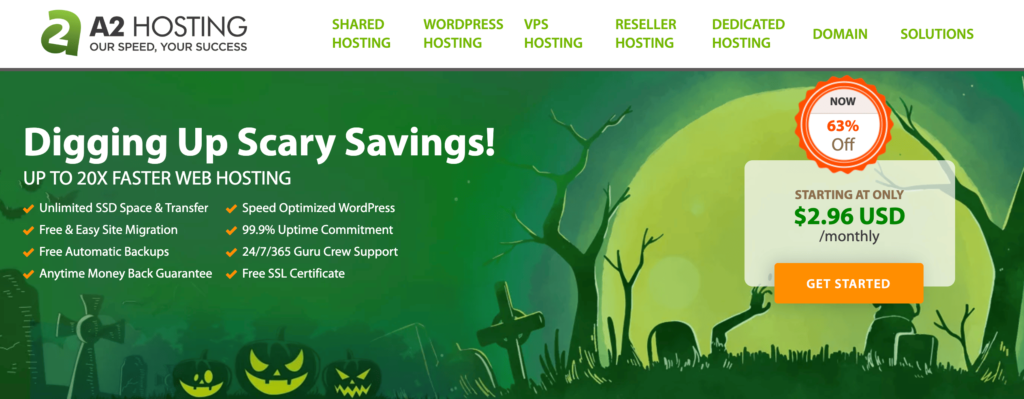
Aside from being one of the fastest providers in the industry, A2 Hosting also delivers a commitment to 99.9% uptime.

A2 credits its customers 5% of the monthly fee for every hour that the site is down. Although downtimes caused by DDoS attacks, network conditions outside of their network, browser issues, caching issues, and ISP network issues aren’t covered in this policy.

Any scheduled maintenance won’t count towards downtime either.

A2 Hosting offers shared, VPS, and dedicated plans. All of which are fast and reliable. If you’re looking for an industry-leader in web hosting, A2 and its strong uptime should be a top consideration.

Understanding Uptime “Guarantees”

Most web hosting providers will offer an uptime guarantee as a selling point. But those guarantees don’t necessarily deliver the results that you’re looking for.

A 99.9% uptime guarantee doesn’t mean that your site will be up and running 99.9% of the time. It usually means that you’ll be credited for any downtime below that promise.

Don’t take uptime guarantees at face value. You need to read the fine print to truly understand what different providers are offering you.

Some uptime guarantees have lots of contingencies. For example, a hosting provider may not count planned server maintenance as qualified downtime. Theoretically, your site could be down for an entire day and you’d receive no compensation for it.

The compensation for downtime is insignificant compared to the amount of money your site is losing as the result of that downtime. So don’t get too excited about a credit or refund. However, a provider’s willingness to offer this type of compensation is usually a good indication of their uptime performance.

Other hosting providers cap the amount that they’ll refund you up to a certain percentage of a plan. Factors like natural disasters, Internet failure, or hacks might not be covered in an uptime guarantee either.

Basically, you can’t just blindly choose a web hosting provider because their homepage guarantees a 99.9% uptime. You need to dig deeper and find out what that means.

What Causes Downtime?

In a perfect world, your website will be up and running 100% of the time from the day you launch it until forever. But that’s just not going to happen.

Even the best web hosting providers have some outages. Here are some common causes of downtime:

  • Scheduled maintenance
  • Server overloads
  • Security threats
  • Hardware issues
  • Software issues
  • Human error
  • DNS issues
  • CMS issues
  • Power outages
  • Natural disasters

As you can see, there are plenty of reasons why your website might be down. It can’t always be attributed to just one thing.

It’s also important to understand that not all downtime is the same.

For example, scheduled server maintenance from 2:00 AM to 4:00 AM on a Sunday morning is different than a crash at noon on a weekday. The former won’t be as harmful as the latter.

Furthermore, the type of website you have can also affect the impact of your downtime. A small personal blog with less than 5,000 visitors per month will survive if its down for an hour. But an ecommerce site with one million monthly visitors would suffer major losses if the site went down unexpectedly.

How to Improve Your Website Uptime

While certain causes of downtime are out of your hands, there are still steps you can take to ensure high uptime rates for your website.

Choose a Reliable Hosting Provider

The first step to high uptime is finding the best hosting provider for your website. While an uptime guarantee is nice to have, I’d rather have a host that delivers on their promise as opposed to simply offering credits as compensation.

Look for hosting providers that have a proven track record in the hosting industry. Customer support is also a top evaluating factor.

If your site goes down, you need to make sure that your hosting provider acts quickly to fix the situation. Find a host that offers 24/7 support so you can call or live chat with an agent as soon as something goes wrong.

All of the providers on the list above are reputable and come highly recommended by our team here at Quick Sprout. So this is a great place for you to start.

Use a Website Monitoring Service

Without a website monitoring service, your site could be down and you won’t even know it. But with website monitoring, you can track the performance of your site and be notified immediately in the event of any downtime.

This gives you the chance to ensure that your hosting provider is doing their job. You can contact your provider to see what steps they are taking to get your site back up and running.

While most hosting providers don’t have the reputation for being dishonest, website monitoring is the best way to know for sure if your guarantees are being met.

Change Your Hosting Plan Type

As you can probably imagine, the type of web hosting plan you have will impact the performance of your website. Uptime definitely falls into the performance category.

Shared web hosting is the most susceptible to downtime because you’re sharing servers and resources with other websites. A problem or traffic spike on one website could potentially bring all sites on that server down.

VPS hosting and dedicated server plans will come with more resources, so there won’t be as much strain on the servers being used by your site. Your site will still be susceptible to downtime related to maintenance, but traffic spikes would be an unlikely cause.

Cloud hosting plans are another hosting option that will increase your uptime rates. This type of hosting involves multiple servers across a network. So if one goes down, your site can stay running on the others.

Use a CDN (Content Delivery Network)

A content delivery network, better known as a CDN, is a way to unload some of your site’s content on servers that are closer to your website visitors.

CDNs are typically used to increase the speed of a website, but they can also prevent incidents that cause downtime. If you use a CDN, then it will free up space on your main server, which reduces strain and lowers the chances of a crash due to a surge in traffic.

Some hosting providers will offer a free CDN with your hosting plan.

Conclusion

Your website is useless if people can’t access it. That’s why you need to find a web hosting provider that delivers high uptime rates.

These are the top options that I would recommend.

Each of these providers is unique in their own way. For example, HostGator is best for scalable resources while Media Temple is best for developers.

So make sure you choose the provider, plan, and hosting type that best fits your needs. But regardless of which option you select, you’ll be satisfied with the uptime rates if you go with a provider on our list.


from Quick Sprout https://ift.tt/2qH8D9P